The Phone in the Room: Why Filming Has Become Part of Running a Night
It happens somewhere every week. A nervous first-timer finishes a song that makes the whole room go quiet. Someone at the back lifts a phone. Two days later the clip is on Instagram with a few thousand views, one very happy performer, and another who had no idea they were filmed and is now rather less happy about it.
Filming has become part of the job of running an open mic, and for good reason. Our companion piece on what venue bookers want from video submissions makes the commercial logic plain: talent buyers treat authentic live footage, shot in front of a real crowd, as the primary evidence that an act can hold a room, and they use social following and engagement as one of the few checkable indicators of how many tickets an emerging artist might sell. The organiser of a good open mic is sitting on exactly that raw material every single week.
That makes your camera a gift to your performers as well as a marketing tool. It also makes it a responsibility. This guide covers both halves: how to capture footage that does your night and your artists justice, and how to do it without anyone feeling ambushed.
The Legal Ground Under Your Tripod
1. Performers hold rights in their own performance
In the UK and across much of Europe, performers have specific legal rights over their live performances. In the UK these sit in Part II of the Copyright, Designs and Patents Act 1988, and recording a live performance without the performer's consent can infringe them, even when the gig is open to the public. An open mic does not change that. Stepping up to a microphone is consent to be heard by the room, not consent to be broadcast to the internet.
2. Faces and voices are personal data
Under the GDPR (and its UK equivalent), an identifiable person on video is personal data. The household exemption, the idea that a family snap is outside the rules, generally does not stretch to posting footage to promote an event or a business, which is what an open mic page is doing. In practice you should be able to say who is being filmed, why, where the footage will appear, and how someone can ask you to remove it. For performers, consent is the cleanest basis. For the audience, a visible notice and sensible framing go a long way.
3. The songs are usually somebody else's
If a performer plays an original, the song is theirs to share. If they play a cover, the song belongs to its writer and publisher. The venue's music licence (collected through bodies such as PRS for Music and PPL in the UK, or GEMA in Germany) typically covers playing music in the room. It does not automatically cover putting it online. Social platforms have their own licensing arrangements with rights holders, which is why many cover clips survive, but it is no guarantee: clips can be muted, blocked or removed, and a business account promoting an event is judged more strictly than a casual one.
4. Audience members, under-18s and the venue
Keep audience faces incidental rather than featured. Do not publish identifiable footage of children without a parent or guardian's agreement. And get the venue's permission: some have their own filming policies, and your footage will show their staff, branding and premises.
Consent Without Killing the Atmosphere
The good news is that getting consent does not have to feel like paperwork at a bank. The best organisers build it into the rhythm of the night, so that nobody is ever surprised by a lens.
| Moment | What to do | Why it works |
|---|---|---|
| Sign-up sheet | Add a tick-box: Happy to be filmed, Ask me before you post, or Please don't film me. | Captures a clear, written choice at the moment people put their name down. |
| Host announcement | One line at the start: We film some sets for our socials. If you'd rather not be on camera, tell me. | Tells the whole room, including the audience, in plain language. |
| Signage | A small notice by the door and near the stage. | Courteous, and a record that people were told. |
| Opt-out marker | A coloured sticker or wristband for anyone who does not want to be filmed. | Lets camera operators avoid them at a glance, with no awkward conversations. |
| Before posting | A quick message: Loved your set, can we share the clip? | Turns a risk into a conversation. Performers usually say yes, and often share it themselves. |
When an Artist Says No
Some performers will not want to be recorded, and it is worth understanding why before you are tempted to talk them round. They may be testing unreleased material. They may be early in their journey and terrified of a bad clip living forever. They may have a day job, an ex, a safety concern or a perfectly private reason. Some simply had an off night and would like it to stay in the room where it happened.
You do not need to know which. A no is enough. In practice that means:
- Do not film their set, and make sure any volunteers with phones know not to.
- If they appear in the background of other footage, crop or cut them out.
- If something has already gone up and they ask you to take it down, do it promptly and without argument.
- Make it clear that saying no will never affect their place on the list.
A reputation for respecting performers is worth more than any single clip. Word travels fast, and the acts you most want on your stage are the ones who need to feel safe on it.
Landscape or Portrait: Let the Destination Decide
Every organiser eventually asks this, and the answer is refreshingly simple: decide where the footage will live before you press record. The music industry has settled into a clear split between horizontal video, used for evaluation, and vertical video, used for discovery.
| Destination | Orientation | Typical length | Best for |
|---|---|---|---|
| YouTube, your website, emails to venues or festivals | Landscape (16:9) | One full song, or a continuous 5 to 7 minute set | The keeper. Shows the whole stage, the band and the crowd. This is the format bookers expect to see. |
| Instagram Reels, TikTok, YouTube Shorts | Portrait (9:16) | 3 to 8 second loops, 30 to 60 second highlights, up to 90 seconds for Reels | Fan discovery. Fills the phone screen and builds the follower and engagement numbers bookers look at. |
| Stories and quick reactions | Portrait (9:16) | A few seconds to 15 seconds | Host intros, crowd moments, behind-the-scenes. |
| Solo singer, close-up | Portrait or landscape | Short clip | A tall frame flatters one person; landscape still wins if the clip is for a booker. |
The format matters more than many organisers realise. Professional bookers generally review pitches on desktop screens, and a horizontal frame is what lets them verify a full band configuration and see the audience at the same time. Plenty of them treat vertical footage as the primary evidence of a live act as a sign of an amateur who does not understand how the industry presents itself. Landscape is the safe default for anything you hand to an artist as a press asset.
The practical compromise: if you only have one phone, shoot landscape at the highest quality it offers, preferably 4K. You can crop a 4K landscape frame into a vertical clip and still have roughly 1,200 pixels across, which is plenty for most social uses. You cannot go the other way round: a portrait recording stretched into landscape gives you black bars or a blurry mess. Whichever you choose, commit for the length of the clip. The phone that wobbles between orientations is the quickest way to make a great performance look careless.
Many touring acts already work this way: one horizontal master as a digital business card, then vertical highlights cut from it for daily social posts. A 30 to 60 second vertical clip posted within 48 hours of the night, tagged with the venue and the performer, is the sweet spot for engagement. You can offer your artists exactly that.
Two Phones Beat One: The Static and Dynamic Method
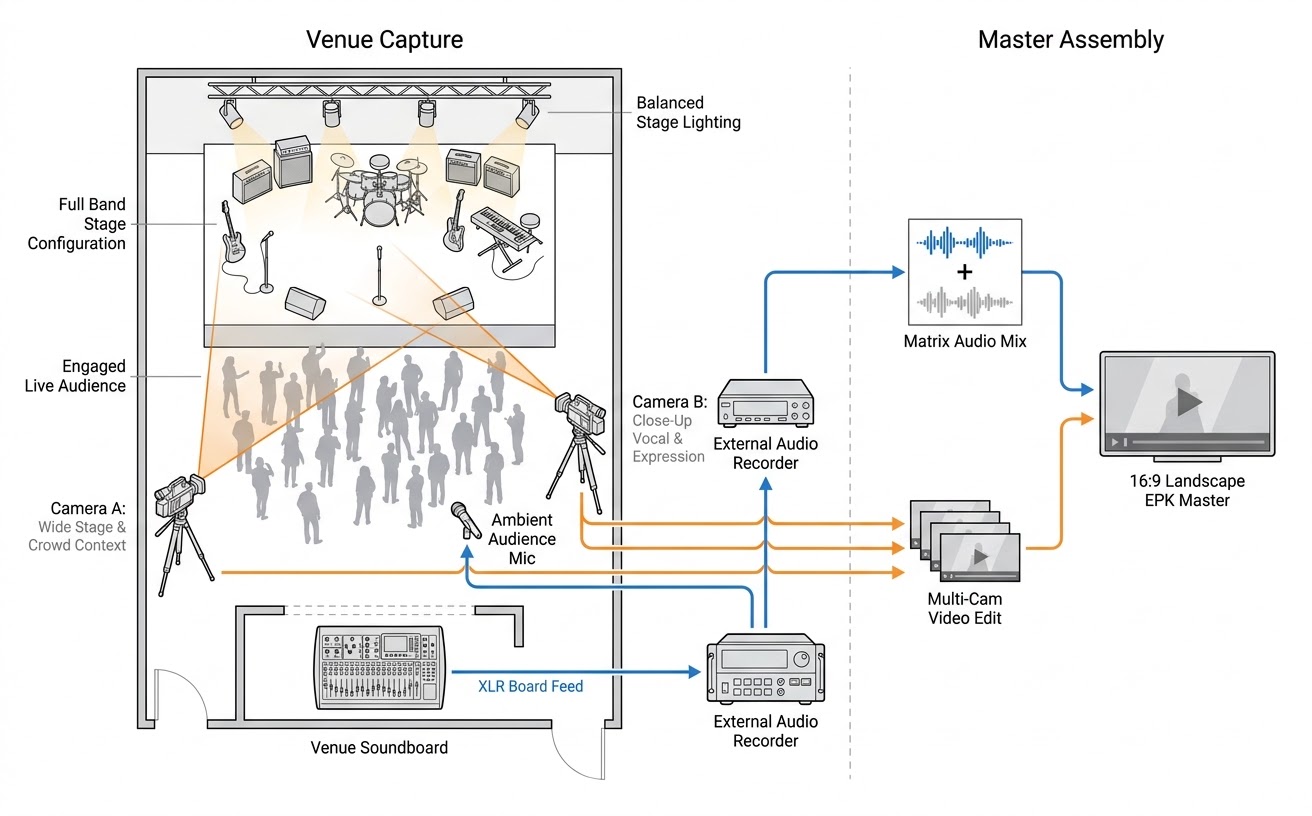
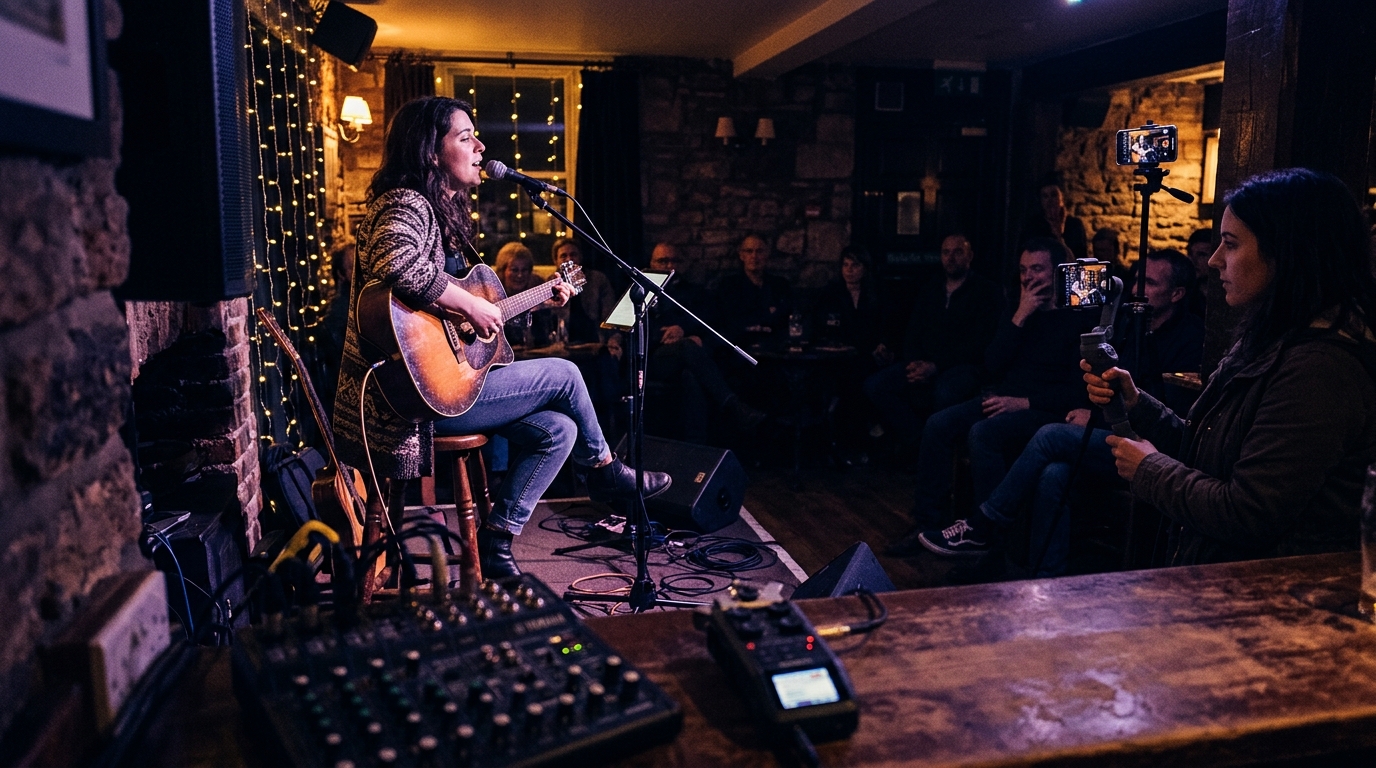
If you want your promotional material to look like the work of a small production team, here is the cheapest trick available: use two phones, one static and one dynamic. It mirrors the two-camera set-up professionals use for press kit shoots, and it costs a tripod and a steady pair of hands.
| Camera | Placement | Job | Gives you |
|---|---|---|---|
| Phone A: static | On a tripod at the back or centre of the room, framed wide or medium, and left alone. | Establishes the performers, the full stage and the audience context. | A safety net and your landscape master. If anything goes wrong elsewhere, this clip still works. |
| Phone B: dynamic | Handheld or on a cheap gimbal, moving quietly at the side or front. | Finds the hands on the guitar, the face at the microphone, the reaction at a front table. | Close-ups and ready-made vertical clips for social. |
Cut between the two in a simple editor and the result looks far more polished than either could alone: a wide shot to establish the room, a close-up for the emotional line, back to wide for the finish. There are a few technical habits that pay off immediately:
- Use continuous face-tracking autofocus. Manual focus in a dark room from ten metres away tends to drift.
- Lock exposure so the picture does not pump brighter and darker as the lights change.
- Set white balance during soundcheck, so stage lighting renders natural skin tones rather than orange or purple faces.
- Add a small portable LED light if the room is very dark, or lift the shadows in the edit.
- Move the dynamic phone slowly. Constant zooming and swooping looks nervous, not dynamic.
- Clap once at the start, or line up the sound waves in your editing app, and your two clips will sync in seconds.
Resist the urge to over-edit. Bookers have a strong, well-founded aversion to rapid-fire highlight montages, because a reel of three-second cuts looks like someone trimming out the weak playing and the quiet crowd. What persuades them is a complete, continuous performance, ideally one song of three to four minutes, with clean angle switches: a close-up for the vocal hook or the solo, a wide shot for the band and the room. Keep your edit honest and your performers will thank you.
Why the Mixer Beats the Microphone
Here is the uncomfortable truth about phone footage: gorgeous pictures with muddy or distorted sound lose to plain pictures with clean sound, nearly every time. Phone microphones are not built for the sound pressure of a live PA. At concert levels they clip and compress, and they favour whatever is loudest and nearest, which is often a conversation at the bar. Many phones also link microphone gain to the camera zoom, so when you zoom in on a performer across the room, the phone boosts the mic and the audio distorts. Turn that setting off if your phone allows it.
For anything you intend to use promotionally, record from the mixer. A feed taken straight from the desk gives you vocals and instruments in clear isolation, which is exactly what a booker or sponsor needs to hear.
- Take a stereo feed from the desk's main or auxiliary output into a small portable recorder (the Zoom H5 and Tascam DR-40X are common choices) or an audio interface.
- Talk to your sound engineer first. They will usually be glad to help, and it is their desk.
- Arrive 30 to 45 minutes before doors and record a 30-second test at full performance volume during soundcheck.
- Set levels so that normal singing and playing peak around -12 dB to -6 dB, leaving headroom for loud moments without digital clipping.
- Blend in some ambient room sound, from a second recorder or a phone placed to catch the room, so you capture applause and atmosphere. A dry desk feed alone can sound sterile.
- In the edit, swap the phone's audio for the mixer recording and line it up with the video.
A short post-production recipe
A little finishing goes a long way. Apply a high-pass filter to remove low-frequency stage rumble, ease back the muddy 200 to 350 Hz region, and add light compression and de-essing so the lead vocal cuts through when someone listens on laptop speakers or an office monitor. It adds perhaps ten minutes to your set-up and an evening to your first edit, and it takes your content from someone's phone clip to something a venue booker takes seriously.
Social Posts and Promotional Material: Two Different Jobs
It helps to think of two separate uses of your footage, because they carry different expectations from performers.
| Social media use | Promotional or commercial use | |
|---|---|---|
| Typical examples | Highlight clips, stories, a night recap, a guest appearance. | Website recap videos, posters and listings, sponsor or funding material, press, compilation reels. |
| Format | Mostly vertical (9:16), short and frequent. | Mostly landscape (16:9), polished and reusable. |
| Consent needed | Clear agreement; best practice is to ask before each post. | Specific consent covering where, how and for how long, ideally in writing (a message counts). |
| Credit | Tag the performer and the venue. | Credit by name where appropriate, and keep a record of what was agreed. |
| If they change their mind | Remove the post promptly. | Remove them from future use and update any live material. |
Social media is the easy win. Short, frequent and in the moment, these posts are usually welcomed by performers because they grow their audience as well as yours. Tag them, credit them, and let them see the clip before it goes live.
Promotional use is the bigger step. When you use someone's performance and image to promote your business, a sponsor, or a funding bid, you are in a different territory from a casual post, and your permission should be clearer and more specific. The same careful approach pays off for performers too: venue marketing teams routinely lift live video and high-resolution photos to build ticketing pages, and artists who can hand over landscape and portrait photos alongside a clean landscape video are far easier to promote. Offer your regulars the footage from their own sets, with the audio cleaned up, and your open mic becomes the place where acts get the material that gets them booked.
The Organiser's Checklist
- Get the venue's permission to film.
- Tell people: sign-up tick-box, a host announcement and a sign by the door.
- Respect every no, and make it easy to say.
- Decide the destination first: landscape for YouTube and your website, portrait for Reels, TikTok and Shorts.
- Use one static wide phone and one moving close-up phone.
- Record clean audio from the mixer for anything promotional, and test it at soundcheck.
- Ask performers before you post, and credit them when you do.
- Keep edits honest: complete performances beat montages.
- Be ready to take anything down quickly, no questions asked.
Strategic Conclusions
Done well, filming does far more than fill a feed. It gives performers something to be proud of, shows venues and sponsors that your night is a serious one, and brings the next crowd through the door. Done carelessly, it can cost you the trust that makes an open mic work in the first place. The difference, almost every time, comes down to asking. Ask the venue, ask the performers, tell the room, and then record the best night you can: wide and steady for the keeper, close and moving for the clips, with the sound taken from the desk.
Sources and further reading
This guide draws on the research summarised in our companion article, Live Music Venue Bookers' Video Submission Preferences, which covers booker expectations, orientation, multi-camera framing and audio capture in depth. The legal overview is general and refers to the performers' rights provisions of Part II of the UK Copyright, Designs and Patents Act 1988, the UK GDPR and Data Protection Act 2018, the EU GDPR, and the licensing schemes run by music rights bodies such as PRS for Music, PPL and GEMA. Check the current position in your own country before relying on any of it.